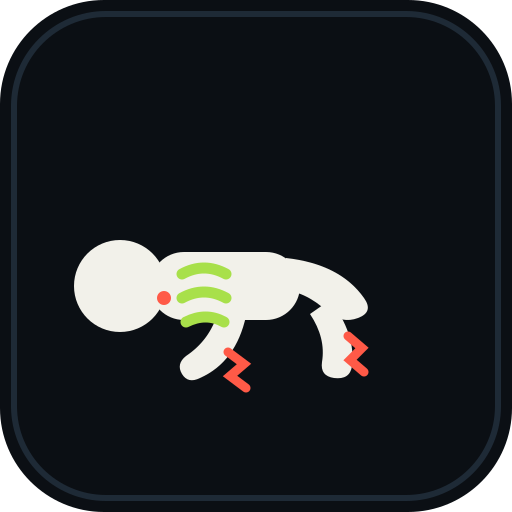
The nine confirmed sandbox events
The Events interface presents a clean 3x3 icon grid containing nine primary disasters. Each event applies distinct physical vectors, thermal status effects, or gravitational alterations across the arena.
| Event Name | Panel Icon & Visual Identity | Mechanical Threat & Environmental Effect | Verification Status |
|---|---|---|---|
Weightless |
Circular gravitational ring with an inverted ragdoll | Inverts map-wide gravity, causing dummies, vehicles, and loose props to drift toward the sky ceiling. | Observed in UI & Shop menu (15 Robux/use). |
Deep Freeze |
Blue ice crystals encasing an immobilized subject | Flash-freezes the arena surface into low-friction ice and coats entities in brittle frost layers. | Observed in UI & Shop menu (19 Robux/use). |
Falling Dummies |
High-altitude cargo crate dropping test dummies | Spawns dozens of airborne ragdolls that plummet from cloud height, creating heavy kinetic collision hazards. | Observed in UI & Shop menu (19 Robux/use). |
Wildfire |
Humanoid silhouette engulfed in yellow-orange flames | Summons towering fire pillars that sweep the map while flaming embers rain from the upper atmosphere. | Fully documented in gameplay and panel text. |
Giant Dummy |
Massive white colossus towering over the skyline | Spawns an oversized humanoid boss entity capable of stomping ground targets and crushing vehicles. | Observed in 3x3 panel grid. |
Meteor Rain |
Flaming atmospheric meteorites with smoke trails | Bombards ground coordinates with explosive kinetic projectiles, gouging blast craters and scattering debris. | Observed in 3x3 panel grid and Starter Pack. |
Tornado |
Twisting funnel vortex sweeping debris and entities | High-velocity rotational wind vortex that pulls loose ragdolls, tools, and vehicles into a spinning funnel. | Observed in gameplay captures and warning signs. |
Black Hole |
Gravitational singularity ring pulling nearby objects | Intense localized gravitational pull dragging all map geometry and entities into a compressed central point. | Observed in 3x3 panel grid. |
Warhead |
Ascending atomic mushroom cloud and blast wavefront | Screen-clearing thermonuclear blast delivering extreme radial shockwaves and catastrophic dismemberment. | Observed in 3x3 panel grid and Starter Pack. |
Official Wildfire specification
During video analysis of disaster activations, the Wildfire interface yielded the game's clearest developer documentation. The official description panel text states:
"Burning columns walk across the map and fire falls from the sky. Everything they touch catches light and runs."
When Wildfire activates, vertical fire twisters march across the paved floor while burning projectiles drop from above. Dummies caught in the perimeter immediately panic, shouting audible distress lines while attempting to locate open water to extinguish the flames. Surviving these intense thermal waves requires careful routing detailed in the disaster survival manual.
Event charges, store pricing, and permanent passes
Players can initiate disasters using either disposable consumable charges or permanent pass licenses from the game passes catalogue.
Consumable charges are purchased via the in-game Shop under the Events tab. Documented on-screen prices reflect the following Robux tiers:
Weightless: 15 Robux per single activation.Deep Freeze: 19 Robux per single activation.Falling Dummies: 19 Robux for 1 use.Falling Dummies x3: 39 Robux for 3 uses.Falling Dummies x10: 99 Robux for 10 uses.Wildfire: 25 Robux per single activation.
For bundled access, the temporary Starter Pack offers a combination of 1 Rocket Launcher, 1 Bow, 3 Meteor Rain charges, and 1 Warhead charge on a rotating promotion timer.
Players seeking unlimited disasters can purchase the permanent Endless Events game pass (299 Robux). This pass completely eliminates per-event Robux fees, allowing you to trigger any of the nine disasters at will with a 20-second cooldown between consecutive activations.
How to launch a disaster event
-
Open the disaster interface. Click the pink
Eventsbutton positioned on the upper-right corner of your screen to reveal the 3x3 selection grid. -
Select your desired catastrophe. Click on the event icon, such as Wildfire or Tornado, to display its mechanical summary card.
-
Confirm available charges. Check whether you have available charges, a free daily allowance, or an active Endless Events pass.
-
Trigger map activation. Press the green
USEbutton to initiate the countdown siren and unleash the disaster onto the sandbox floor.
Handling disaster damage and character knockouts
-
Seek immediate environmental shelter. When sirens sound, move away from open tarmac and seek low-lying structures or dive into swimming pools to extinguish flame ticks.
-
Clear fallen casualties. Once the storm clears, tap R on your keyboard to instantly revive scorched or shattered dummies across the facility.
-
Reset the event cooldown timer. Wait out the standard 20-second activation buffer before queuing another environmental catastrophe.
The unverified Tsunami listing
While developer promotional copy on the primary Roblox game page mentions "Tornado, Tsunami, Meteor Rain and more", no Tsunami event appears within the 3x3 Events panel in playable recordings.
No recorded footage shows an active water wall sweeping the map, nor is Tsunami listed among the consumable store products. It remains unverified whether Tsunami was planned for a secondary menu page, withheld for a future patch, or replaced by existing aquatic hazard pits.
FAQ
Does triggering an event damage my own player character?
Yes. Unlike stationary testing tools, map-wide disasters such as Tornado wind shears, falling meteors, and Wildfire twisters inflict active ragdoll trauma and health damage to player avatars.
Can multiple disasters run simultaneously in the same arena?
Under standard gameplay, launching a disaster initiates a map-wide phase accompanied by an active status banner. Secondary triggers remain locked until the active event completes its duration and cooldown.
Do event charges expire if I leave the server?
Purchased consumable charges are stored on your account profile data and persist between play sessions.
Can dummies trigger events on their own?
No. Dummies wander, fight back, and assist fallen allies, but they cannot access user interface buttons or purchase disaster activations.